
Before you begin
A Python-capable developer or technical team is recommended for installation, security configuration and deployment. This deterministic tool compares only the rows and catalog rules you supply; it does not discover live dependencies, read an enterprise system or authorize a release.
All users of an installation share the same reviews and can edit notes, export, replace or clear them. Individual identity, roles, tenant isolation and immutable audit history are absent. Use synthetic inputs until your own technical/data owners accept the deployment.
1. Check the source release before extracting
This source edition remains in preparation. When an approved purchase becomes available, obtain the exact archive and signed manifest through your account library. Verify the whole ZIP signature and digest using the separately trusted Store verifier and independently confirmed public-key fingerprint. A key or hash inside the archive cannot authenticate itself.
The standard conditional source license covers the eligible purchased release for the purchasing organization’s internal use. Hosted infrastructure, provider accounts, future major releases, unlisted support, commercial services for third parties and source redistribution are not included. Third-party dependency rights remain separate.
Download the standalone archive verification helper
Download the Store release public key; confirm its fingerprint independently
A passed metadata field, screenshot, filename or native source fingerprint is not permission to distribute software or proof of production suitability.
2. Install and start a local synthetic workspace
Checked baseline: Linux/Python 3.13.16 and a current browser. Interpreter, browser, gateway and system packages are buyer-managed. Use an external environment, private umask and private absolute runtime directory outside the source. Installation needs your approved package source; analysis itself makes no outbound request.
- Open http://127.0.0.1:6261 on the same machine. Default demo mode requires loopback host/client and must not be exposed through a public proxy.
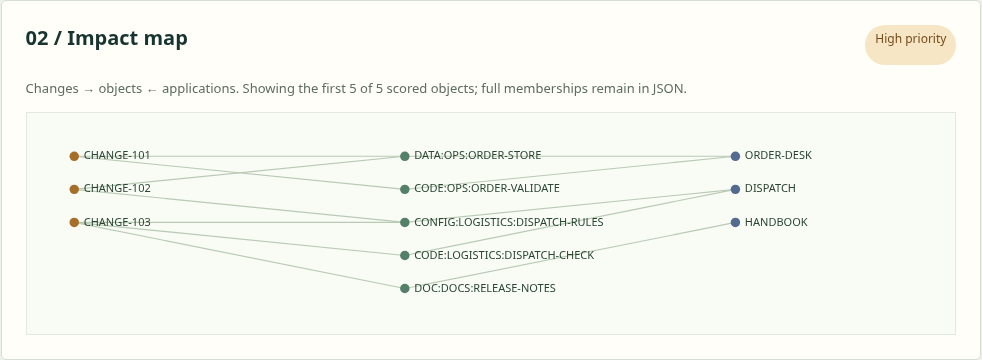
- Select Analyze synthetic example. The actual fictional batch has seven memberships, five unique objects, three changes and two shared change pairs.
python3.13 -m venv ../impact-env
../impact-env/bin/python -m pip install --require-hashes -r requirements.lock
umask 077
PT_IMPACT_DATA_DIR="$HOME/.local/share/pt-change-impact" ../impact-env/bin/python app.py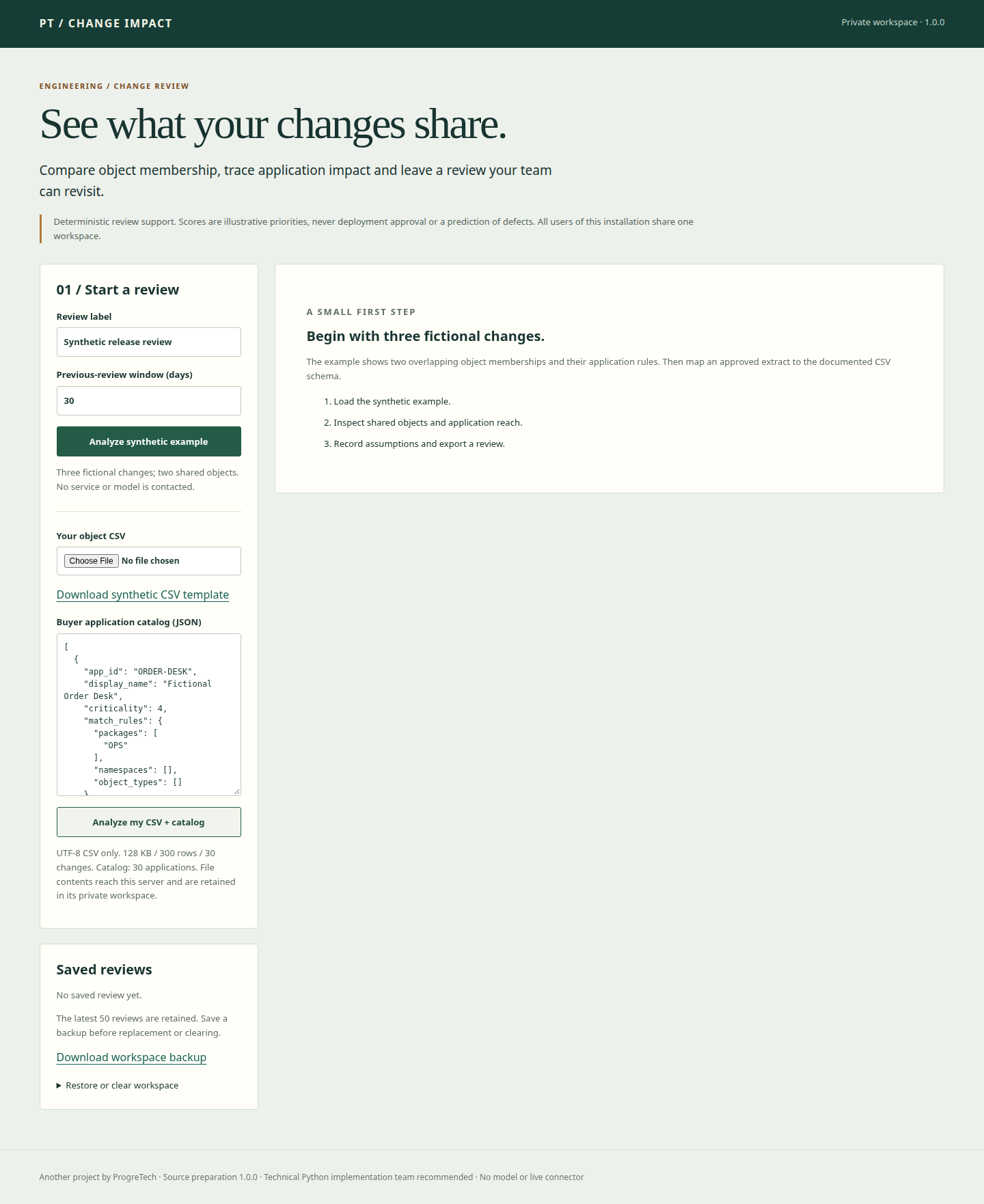
The app creates workspace.sqlite in the private runtime directory. Existing directory permissions are not repaired. Stop the owned demo with Ctrl+C.
3. Inspect overlap and leave a review
- Read the Impact map: changes on the left, objects in the middle, applications on the right. For larger inputs only 24 objects appear in the graph; complete findings remain in JSON.
- Inspect Shared objects, Application reach, object mix and per-object point reasons. Missing matches do not prove an application is unaffected.
- Select Needs follow-up, enter a synthetic assumption and Save review note. Export Full findings JSON, Object CSV and Printable review HTML; open them and compare the known values.
- Download the synthetic CSV template and upload it using Analyze my CSV + catalog with another label. The second saved review shows overlap with the first.
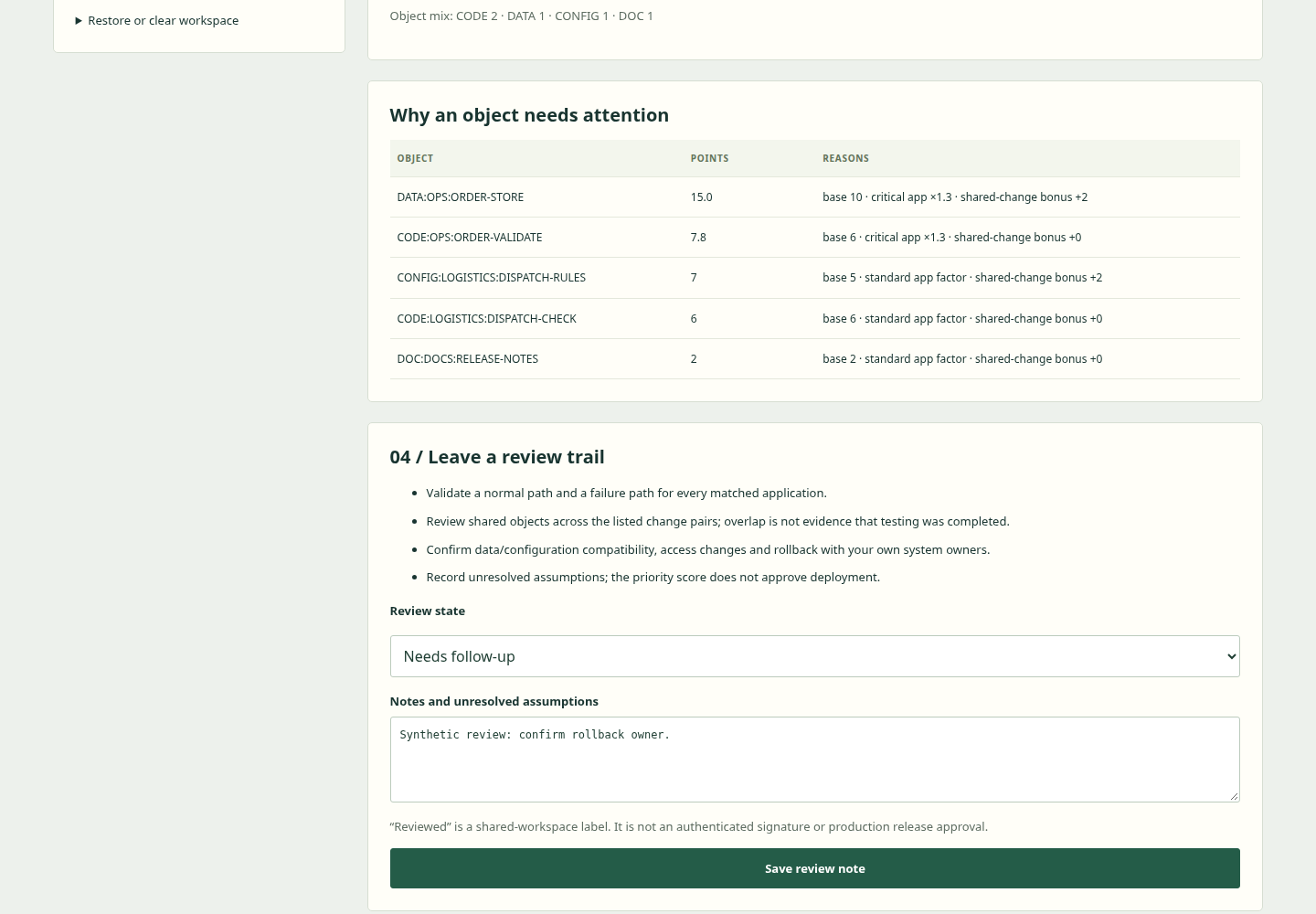
Reviewed is a shared editable label. The printable HTML is a document for browser Print; the server does not produce a PDF or signed approval.
4. Prepare your own approved inputs
CSV must be UTF-8, optionally with BOM, with the exact ordered header change_id,obj_type,obj_name,package. All four values are required. Identifiers normalize to uppercase, 1–100 characters, beginning with a letter/digit and using only letters/digits/underscore/dot/slash/hyphen. Colon is reserved for TYPE: PACKAGE: NAME keys. Types are CODE, DATA, CONFIG, DOC or OTHER.
Limits: 128,000 CSVbytes, 300 rawrows, 30 changes; duplicates of the same change/type/package/name collapse. Shared objects across distinct changes remain. No XLSX/PDF or source system schema guessing is supported.
Catalog JSON is an array of 1–30 applications, each with exactly app_id, display_name, criticality, match_rules. criticality is integer 1–5. match_rules has exactly packages, namespaces, object_types lists; at most 8 patterns per list and 100 characters per pattern. At least one package/name rule is required.
An application match needs the type filter, if supplied, AND an actual package OR name shell-wildcard match. Application shares can overlap. Catalog text is limited to 32,000 characters; duplicate/nonfinite JSON is rejected. See included docs/guide.md for the complete example and schema.
Rows, catalog, labels, findings and notes are retained in this shared private workspace. Do not upload confidential extracts until your organization approves its own deployment and access controls.
5. Understand the priority and history rules
Unique-object base points: CODE 6, DATA 10, CONFIG 5, DOC 2, OTHER 3. A matching criticality 4/5 application multiplies base points by 1.3. Extra distinct changes containing the same object add 0, 2, 5 or 9 points for 0, 1, 2 or 3+additional memberships. Every matched key counts; no first-ten criticality approximation.
Batch score is the capped rounded mean object points times 12.5: Low below 40, Medium 40–74, High 75+. These are transparent review heuristics, not defect probabilities or validated risk.
Prior-review overlap compares supplied keys against retained reviews in the selected 1–365 dayUTCwindow; future/out-of-window records are excluded. It does not add score points or certify testing. At most 50 reviews remain; old link targets can be pruned. Export before pruning.
6. Models and external integrations
BYOM is not applicable because this edition contains no inference/agent workflow. Core analysis works without a model, provider subscription, API key or licensing connection.
No live enterprise connector, source discovery, original cloud binding or identity provider is bundled. Adapt the neutral CSV/catalog with your own approved team. Adding a future connector or model requires a separate technical/privacy review.
7. Configure private shared use
Set PT_IMPACT_MODE=server, PT_IMPACT_USER, a random PT_IMPACT_PASSWORD of 20+characters, PT_IMPACT_SESSION_SECRET of 32+characters, exact comma-separated PT_IMPACT_HOSTS and a private external PT_IMPACT_DATA_DIR. Supply actual secrets through your secret manager, never source or browser fields. .env.example is documentation and is not loaded automatically.
Server mode refuses missing configuration, debug/testing, unapproved Host and HTTP before Basic authentication. This is shared operator access, not named-user SSO/MFA. Keep the worker listener inaccessible around your buyer-owned private HTTPS gateway.
Exactly one trusted TLS proxy may be enabled with PT_IMPACT_TRUST_PROXY=1 only when it overwrites incoming forwarding headers and blocks direct access. Proxy trust is off by default. All routes, including static/health/exports, use the same boundary.
../impact-env/bin/gunicorn --bind 127.0.0.1:6261 --workers 1 --threads 2 --timeout 60 'app:create_app()'One-worker private baseline is checked locally. Actual buyer TLS, firewall, rate limits, capacity and operating system access need separate qualification.
8. Back up, restore, update and recover
Download workspace backup before replacement/clearing and before reaching 50 reviews. Keep protected source/manifest/locks and buyer configuration references separately; never put credentials or database backups in source/Git.
Restore requires an explicit replace confirmation and a valid workspace-v 1 JSON backup within 8,000,000 bytes/50 reviews. All records validate before atomic replacement; derived results are recomputed rather than trusted from supplied scores. Test in a disposable private runtime and compare known inputs, states and notes.
For filesystem backup, stop the service cleanly before copying the whole private runtime, or use a qualified SQLite backup method. Deletion/clear/pruning does not guarantee physical erasure or remove external downloads/backups.
Upgrade into a new verified source/environment and test a restored disposable copy. Keep the previous unchanged source/environment/runtime snapshot for rollback; future schema compatibility is not promised.

Watch the short authentic synthetic workflow recording
Troubleshooting: 400 Host/CSRF/input—check exact configuration/schema and reload safely; 401—check protected operator credentials; 403—check loopback/TLS; 404—review may be missing/pruned; 500—check private storage/locks and conflicting writers. Send only version and a new synthetic reproduction to info@progretech.com. No unlisted SLA or production certification is included.