
1. Choose the right scope
PT Engineering Assistant is a self-hosted plain-text chat harness for technical writing, requirements and review. A Python-capable developer or technical team is recommended for installation, access control and deployment.
This 1.0.0 source candidate remains in preparation. The guide shows actual local synthetic chat evidence; it does not establish a released purchase entitlement or approved source download.
The application sends approved conversation text to your model and shows its answer. It includes no execution tools, filesystem reader, upload, SQL engine, enterprise connector, background agent or completed-action verification.
Generated answers require human verification. Source purchase does not include model weights, inference hardware, provider usage, Microsoft rights or a support SLA.
2. Verify and install locally
After an approved release becomes available, obtain its archive and signed manifest through your active ProgreTech account library. Verify the manifest signature with an independently trusted Store public key, then verify the archive digest. These instructions do not download this unreleased candidate.
Use Python 3.11 or later and a fresh directory/environment; development checks used Python 3.13.16. The hash-locked requirements resolve 14 runtime packages. Installation needs a package repository or buyer-maintained mirror. The example .env file is a reference and is not loaded automatically.
- Open http://127.0.0.1:6219 on the same machine. The default provider is disabled and the interface reports that no model is connected.
- Choose Draft a rollout checklist. It fills a fictional draft; it does not submit a prompt or fabricate an answer. Send remains disabled until the operator configures a provider.
- Stop with Ctrl+C before changing environment configuration. Keep demo mode local; it rejects remote clients and unexpected Host names. Do not expose the development server through a public tunnel.
python3 -m venv .venv
.venv/bin/python -m pip install --require-hashes -r requirements.lock
.venv/bin/python app.py
3. Connect your own Ollama model
Install and license your chosen runtime/model separately. Set the Ollama origin without /api and the exact name of an already-installed chat model. No automatic download or fallback occurs. Loopback refers to the application host or container.
The adapter appends /api/chat, sends messages with stream=false and options.num_predict=700, and reads message.content. A network-hosted Ollama service must use HTTPS; a local URL alone does not establish offline processing or an approved data boundary.
Restart and confirm the interface identifies your route/model. The captures below use actual loopback Ollama with llama3.2:3b-no-vision; that installed model is evidence of one working route, not a bundled or universally suitable model.
export PT_ENGINEERING_PROVIDER=ollama
export PT_ENGINEERING_MODEL_URL=http://127.0.0.1:11434
export PT_ENGINEERING_MODEL=YOUR_INSTALLED_CHAT_MODEL
.venv/bin/python app.py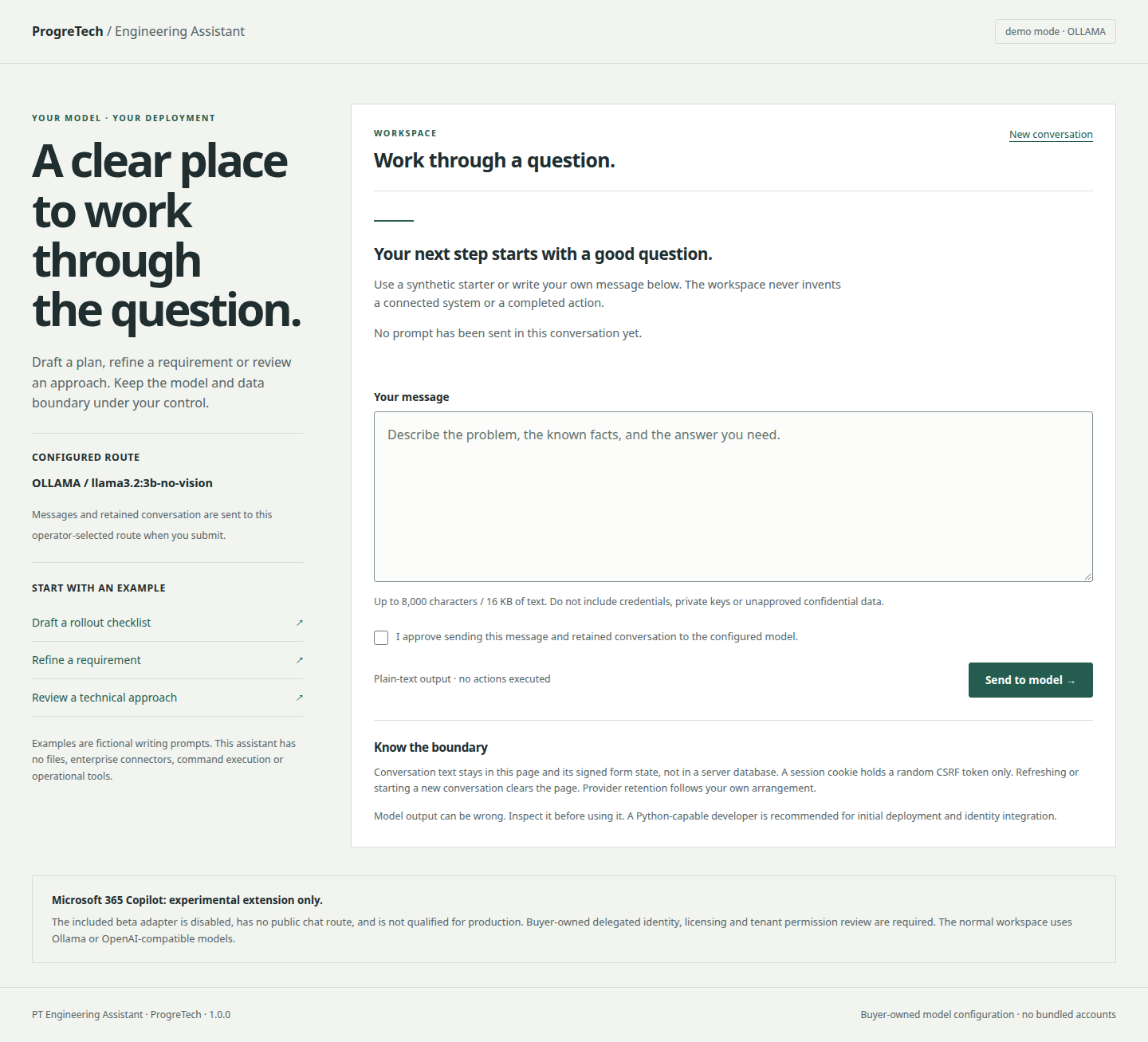
4. Configure an OpenAI-compatible route
Set PT_ENGINEERING_PROVIDER=openai, PT_ENGINEERING_MODEL_URL to your approved Chat Completions base URL, PT_ENGINEERING_MODEL to the model ID, and supply PT_ENGINEERING_MODEL_KEY through your secret manager or process supervisor. Keys and endpoint URLs stay server-side; the browser cannot choose them.
The adapter appends /chat/completions and sends model, messages, stream=false and max_completion_tokens=700. It reads choices[0].message.content. Check this exact contract with your provider; compatibility with a different token parameter or response format is not implied.
The public OpenAI endpoint requires a key; a local compatible server may not. Remote routes require HTTPS and certificate verification. Embedded URL credentials, query strings, fragments and redirects are rejected. The transport ignores inherited HTTP proxy environment settings, so qualify the actual network route explicitly.
export PT_ENGINEERING_PROVIDER=openai
export PT_ENGINEERING_MODEL_URL=https://YOUR_APPROVED_PROVIDER/v1
export PT_ENGINEERING_MODEL=YOUR_APPROVED_CHAT_MODEL
# Supply PT_ENGINEERING_MODEL_KEY through your secret manager
.venv/bin/python app.py
Provider terms, data region, retention, availability and costs are your responsibility. No paid-provider fallback is included.
5. Approve and send a synthetic message
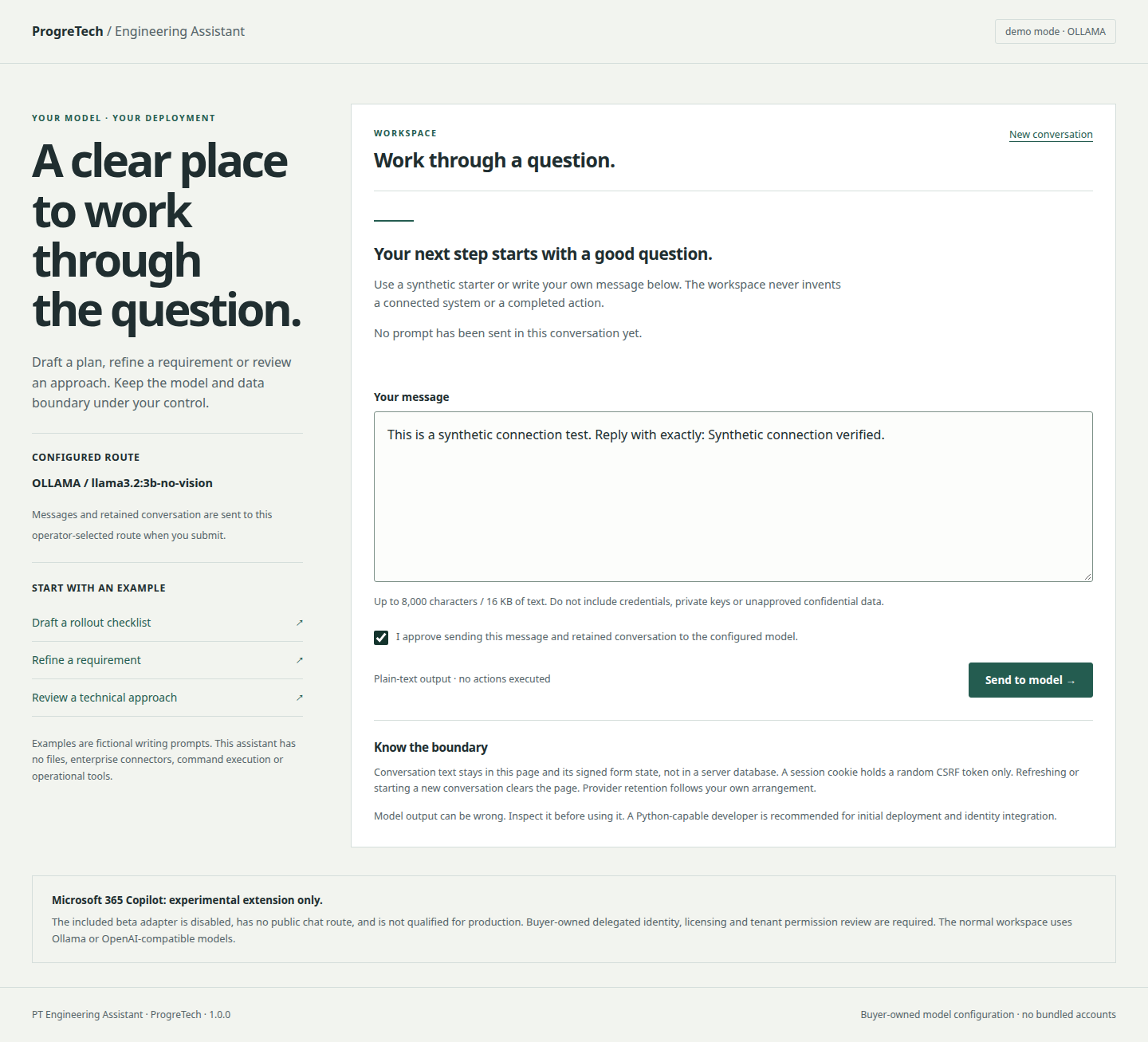
Begin with fictional text. Sending transmits your current message, retained conversation and the application’s fixed system prompt to the configured provider. Approve that processing deliberately, even for a local route.
An operator must review provider permissions, retention terms and organizational data policy before real information is used. Never put credentials, private keys or unapproved confidential information into a prompt.
- Enter: This is a synthetic connection test. Reply with exactly: Synthetic connection verified.
- Check the approval for sending this message and retained conversation to the configured model. Without that approval, the request is rejected.
- Select Send to model. Wait for the non-streaming reply under Model — verify this answer. Accept a genuine response as transport evidence; exact wording is model-dependent.
- Inspect the text and record any evidence needed through your approved process. The application does not execute or verify anything the answer describes.
6. Draft and review a follow-up
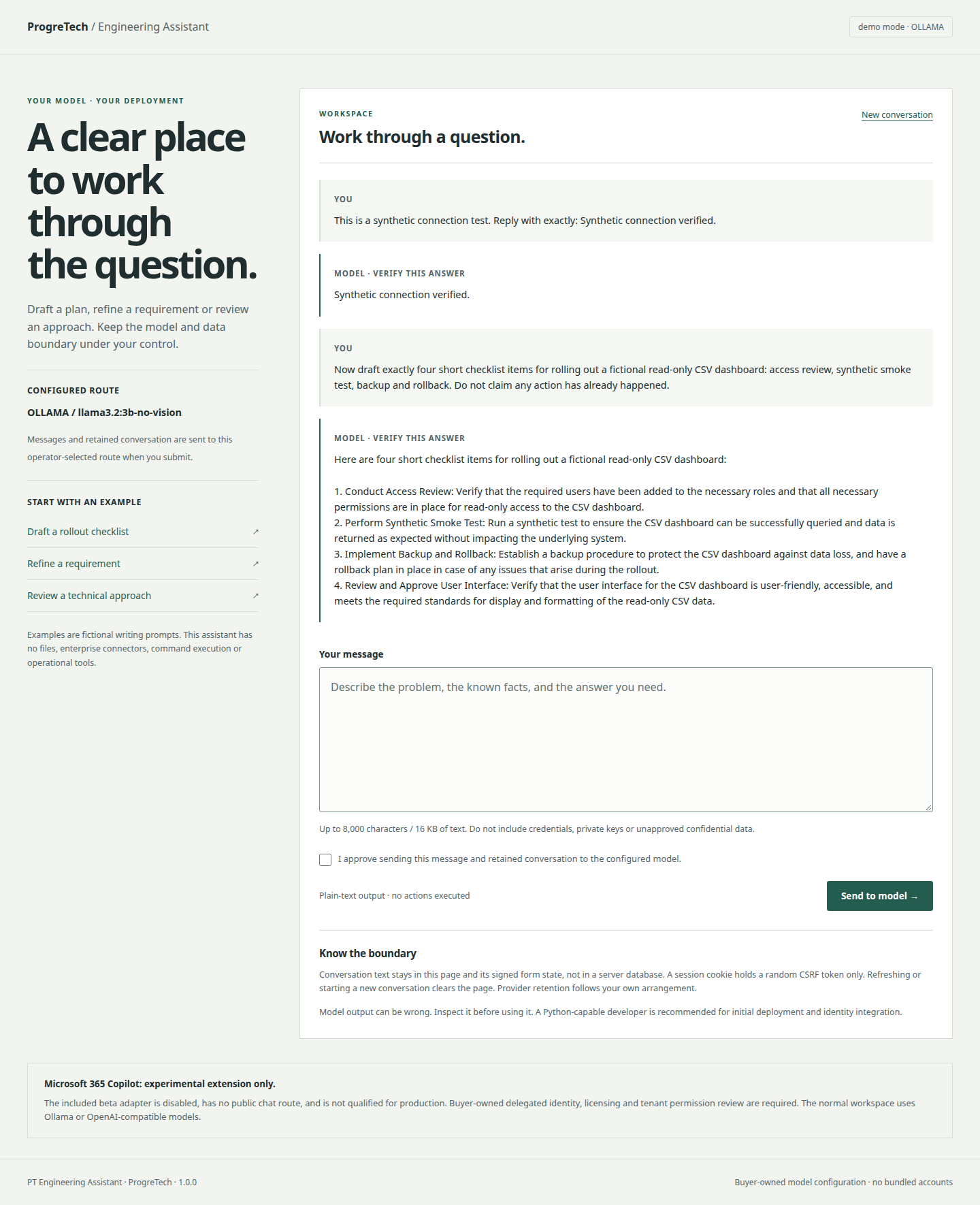
A follow-up sends the bounded recent conversation again. In the actual capture, the user asks for four short rollout checklist items for a fictional read-only CSV dashboard. The local model produces a writing draft, displayed as text requiring verification.
Compare the answer with the requested scope, known facts and acceptance criteria. The captured model proposes an additional interface-review item; it is a draft to revise, not proof that access, backups or smoke tests have been performed.
- Ask: Now draft exactly four short checklist items for rolling out a fictional read-only CSV dashboard: access review, synthetic smoke test, backup and rollback. Do not claim any action has already happened.
- Approve sending the retained conversation again, submit and inspect the returned draft.
- Choose New conversation to clear the visible workspace. A fresh GET or reload starts over. Rejected/failed requests return a new page rather than preserving the failed draft; retain needed text through your approved process before continuing.

Watch the actual short desktop chat capture (silent, 8.32 seconds)
The recording is a short scripted capture, not an installation-time or model-latency promise. No real enterprise data or Microsoft service is shown.
7. Understand history and browser privacy
There is no transcript database. Conversation text lives in the rendered page and hidden signed form state. The token is readable, not encrypted; signing detects alteration and binds it to the current browser session’s random CSRF value.
State expires after one hour. At most eight complete user/assistant turns and 64,000 decoded JSON bytes are retained, dropping oldest turns. A prompt is limited to 1–8,000 characters and 16,000 UTF-8 bytes; returned answer text is capped at 16,000 UTF-8 bytes. Long outputs/context can be truncated; this is not a durable full transcript.
The session cookie holds a random CSRF value, not chat text or provider tokens. Server cookies use Secure, HttpOnly and SameSite=Strict. Responses are no-store; there is no application localStorage or service-worker transcript cache.
New conversation/reload clears the page’s active state; it is not a secure erase of browser memory, history/back-forward snapshots, screenshots, provider records or infrastructure logs. The app has no transcript export or remote wipe. Use an isolated browser profile and an approved retention policy when needed.
An old signed form/token may remain valid within its expiry and original session. Clearing the displayed conversation is not token revocation. Rotate the session secret only through an intentional operational change.
8. Plan request and operating limits
HTTP request bodies are capped at 180,000 bytes; provider JSON responses at 1,000,000 bytes. The transport uses a five-second connection timeout and a 90-second read timeout. These are transport/inactivity bounds, not a hard total wall-clock deadline for a slowly arriving response.
The app is synchronous and non-streaming. It has no built-in user quota, spending ledger, request queue or global concurrency limit. Configure proxy deadlines, rate/concurrency controls, provider budgets and host resources for your workload.
The current source regression suite has 16 tests covering consent, size/Unicode/CSRF bounds, session-bound history, text escaping, provider contracts and fail-closed server/TLS behavior. Synthetic contracts and local route smoke checks do not qualify general model accuracy, load or every provider/model.
9. Deploy behind private HTTPS
For controlled shared use, set PT_ENGINEERING_MODE=server, PT_ENGINEERING_USERNAME, an independently random PT_ENGINEERING_PASSWORD of at least 24 characters, PT_ENGINEERING_SESSION_SECRET of at least 32 characters, and PT_ENGINEERING_TRUSTED_HOSTS as comma-separated exact hostnames. Missing settings and wildcard hosts fail startup. Store secrets outside source and screenshots.
Server mode rejects plaintext HTTP before authentication. Every route, including health, static and API, requires the buyer-owned HTTP Basic identity. This is one shared technical account, without organization membership, SSO, per-user authorization, tenant isolation or audit-grade identity. Integrate and qualify a user-aware access layer before wider enterprise use.
Run the included locked Gunicorn behind your approved TLS proxy on a private listener. Keep a stable session secret across workers; the session cookie requires HTTPS. Preserve the expected Host, keep sensitive values out of URLs/logs, and configure health probes to authenticate.
- For exactly one trusted private TLS-terminating proxy, set PT_ENGINEERING_TRUST_PROXY=1. This trusts one forwarded protocol value only.
- Prevent direct access to the worker and require the proxy to overwrite incoming forwarding headers. Do not enable this option on a publicly reachable worker.
- For direct WSGI TLS, leave proxy trust disabled. Verify HTTP is rejected, HTTPS without credentials returns 401, and authenticated HTTPS can create a session and submit a consented synthetic chat.
- Apply rate limits, egress controls, spending limits and minimal log retention. HTTP Basic credentials can remain cached by a browser; use isolated sessions and rotate/revoke your credentials through the approved access layer.
.venv/bin/gunicorn --bind 127.0.0.1:6219 --workers 2 --threads 2 --timeout 120 'app:create_app()'10. Integrate the bounded JSON API
Use the same access boundary as the web workspace: loopback demo or authenticated buyer-owned HTTPS. No CORS access is enabled. Keep the technical password, session cookie, CSRF value and history state private; do not embed credentials in a public frontend.
GET /api/session returns csrf_token and version. Retain that cookie session. POST /api/chat with Content-Type: application/json and X-CSRF-Token matching that session. Supply prompt, consent="yes" and history="" for the first turn.
A successful JSON response contains answer, history and generated:true. Return the opaque signed history on follow-ups in the same cookie session. It contains readable conversation text; keep it out of URLs, logs and other users’ sessions.
Provider/network/validation failures return a safe error with HTTP 400, authentication uses 401, body overflow uses 413 and unexpected errors use 500 without raw provider details. API clients must handle these explicitly. There is no automatic retry; an HTTP response alone does not prove a model answer or action.
# JSON body for the first authenticated, CSRF-protected request
{
  "prompt": "Draft acceptance checks for a fictional CSV dashboard.",
  "consent": "yes",
  "history": ""
}
The API is a starter backend. Buyer identity, authorization, tenant boundaries, quota accounting, audit retention and policy enforcement are separate implementation work.
11. Keep the Copilot experiment separate
Microsoft 365 Copilot is not a delivered production integration in this candidate. The isolated experimental function is disabled by default, has no browser/public chat route or OAuth sign-in flow, and always refuses server mode. Normal chat uses your Ollama or OpenAI-compatible route.
The underlying Microsoft Graph Chat API is beta/preview; Microsoft marks beta APIs unsupported for production. A buyer experiment requires its own licensed work/school user, delegated OAuth application/consent, user-bound token lifecycle and tenant permission/security review. No tenant ID, account, registration, grant or token is bundled.
Only synthetic request contracts were tested. No actual Microsoft tenant, permission grant, delegated token or Copilot answer was exercised. A production integration requires a supported API and a separately qualified buyer implementation; buying this source supplies neither Microsoft rights nor tenant acceptance.
Microsoft: Chat API preview overview and licensing
Microsoft Graph: beta chat operation and production limitation
12. Restore, upgrade and roll back
There is no application transcript database to restore. Back up your verified source release, signed manifest, dependency lock/inventory, buyer modifications and approved proxy/identity configuration. Store secret-manager references separately from secret values.
If your organization needs durable transcripts, design and review a separate user-scoped retention/export feature before relying on it. Screenshots and copied text remain your data under your own policy.
- Restore the same verified release into a clean environment and reinstall with --require-hashes. Restore approved configuration and secret references.
- Run the included tests, check rejected HTTP/unauthorized access and perform a synthetic two-turn chat with your approved provider. Check responses and logs for accidental credentials.
- For upgrades, verify the new signed package and review CHANGELOG, dependencies, model contracts, system prompt, limits and your modifications. Stage separately and test before switching traffic.
- Retain the previous reviewed environment/configuration for rollback. A stable session secret supports routine restarts; rotation invalidates existing forms/history and requires a new conversation. There is no database migration.
PYTHONDONTWRITEBYTECODE=1 .venv/bin/python -m unittest discover -s tests -v13. Resolve common problems
Send disabled: configure an approved provider/model and restart. A synthetic starter fills a draft only. Demo 403/Host rejection: use localhost directly; for shared use configure server mode and exact hosts instead of bypassing the demo boundary.
HTTPS/401: verify the private proxy, the explicit one-proxy setting and buyer credentials. CSRF error: reload, allow the cookie and confirm all workers use the same stable session secret. Secure cookies need HTTPS.
Invalid/expired conversation: start a new conversation. Old, altered or cross-session state is rejected. Web errors reset the active page and failed draft; keep needed nonsecret text before retrying.
Provider failure: verify the base URL, model ID, contract, key/permissions and runtime health without printing secrets. Redirects are refused. For slow requests, check runtime resources and proxy/worker deadlines; there is no background long-running job or automatic fallback.
Answer is inaccurate or claims an action: treat it as untrusted text. The app has no tools or enterprise connection, so verify facts and perform approved actions in the appropriate system. Copilot unavailable is expected for the disabled isolated experiment.
14. Read notices and support terms
Read LICENSE.txt, docs/dependency-inventory.json and all retained third-party/ licenses and NOTICE files in the approved package. The application’s ProgreTech commercial license does not replace dependency rights. The lock resolves 14 packages, with 17 original license/NOTICE files retained.
Direct dependencies include Flask (BSD-3-Clause), requests (Apache-2.0) and Gunicorn (MIT); transitive obligations include certifi’s MPL-2.0 and Packaging’s Apache-2.0-or-BSD choice. Model weights, inference runtimes, providers and Microsoft products have independent terms and are not bundled.
The actual screenshots and short recordings are original synthetic browser evidence, preserved unchanged with a scoped provenance record. They demonstrate a local route and responsive rendering, not regulatory compliance, universal accuracy, enterprise access controls or release approval.
For delivery or installation questions, contact info@progretech.com with the version, nonsecret symptom and synthetic reproduction. Never send keys, passwords, tokens, private conversation text or environment dumps. Purchase terms determine support/update eligibility; no unlisted SLA or provider allowance is included.