
1. Choose your workspace
Stock 0.1.1 contains items, warehouses, receipts, issues, transfers, counts, linked reversals and audit exports for one organization. Owners maintain shared setup; operators record stock movements. The included interface is stock-classic.
Try the separate guest companion with sample data only. Each guest workspace lasts one hour; End deletes it. Your purchased installation uses persistent private data and local accounts.
2. Install privately on Linux
Verify the downloaded archive and signature against the Store public key through your trusted verification process. Read the source agreement and independent dependency notices. Use Linux amd64 and CPython 3.13 with distribution/requirements.runtime.lock.
Use a dedicated service account and restrictive umask. Initialize a new absolute private path outside source once. Enter a new password of at least 12 characters at the prompt. Administrative messages use --lang en, es or ja. The serve command is for local use.
python3.13 -m venv .venv
.venv/bin/python -m pip install --require-hashes --only-binary=:all: -r distribution/requirements.runtime.lock
.venv/bin/python main.py --lang en --data-dir /srv/private/stock init --username owner
.venv/bin/python main.py --lang en --data-dir /srv/private/stock user --username operator --role operator
.venv/bin/python main.py --lang en --data-dir /srv/private/stock serve --port 8080
3. Record and correct stock
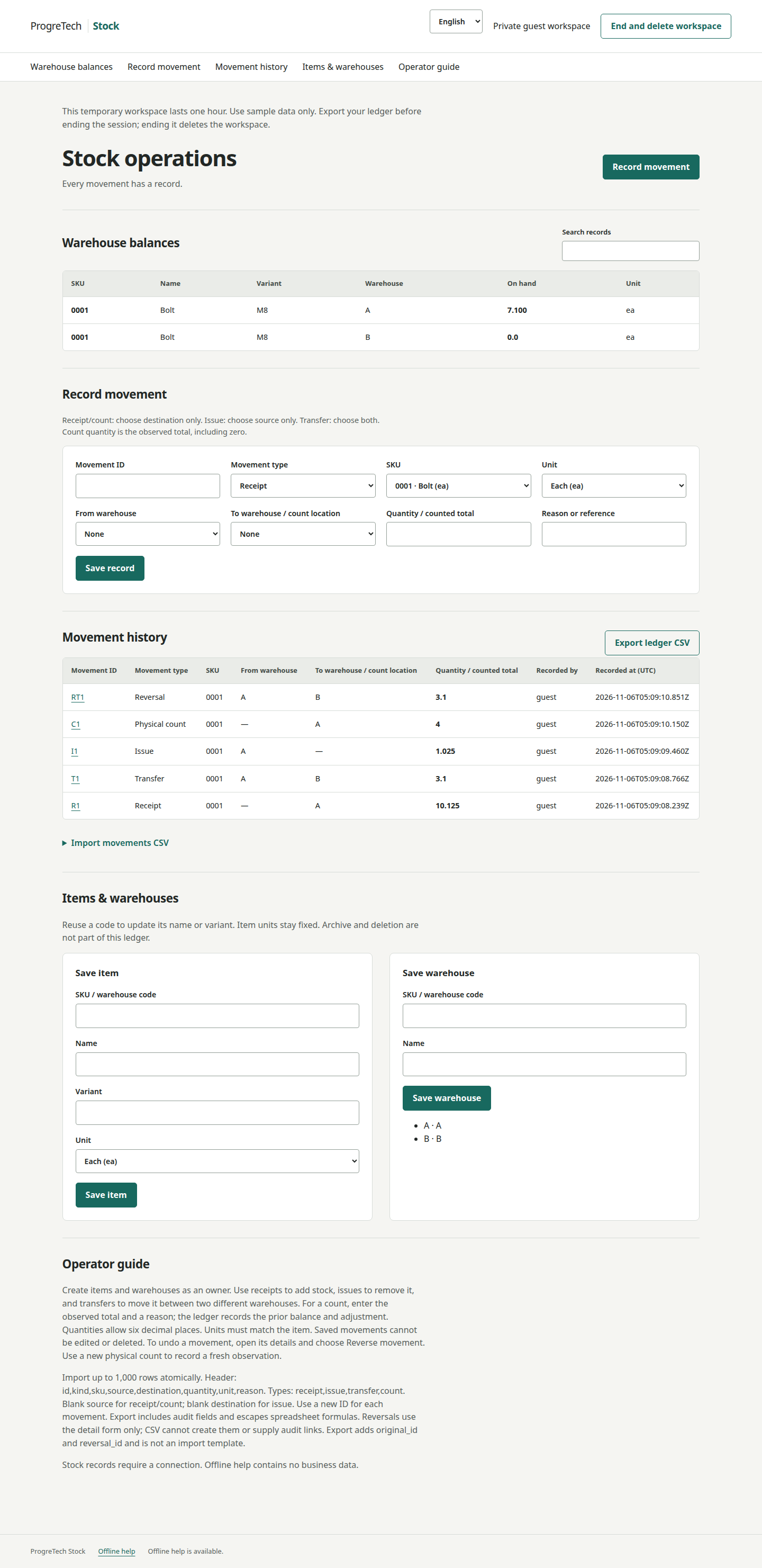
Create item 0001 with unit ea and warehouses A and B. Receive 10.125 into A, issue 2.025, transfer 3.1 from A to B, then count A as 4. Balances are A=4 and B=3.1. A count is the observed total, including zero.
Open the count and reverse it with a new movement ID and reason: A returns to 5. The original entry and actor remain. A reversal cannot itself be reversed, and movements that would make stock negative are refused.
4. Import and export the ledger
Use UTF-8 CSV with the exact header below. Up to 1,000 rows fit within the 1 MiB whole-request limit. All rows commit together; one invalid row rolls back the batch. Check movement IDs before retrying.
Use the movement detail form for reversals. Audit exports include original/reversal links and spreadsheet-formula protection. They are reconciliation reports, not import templates.
id,kind,sku,source,destination,quantity,unit,reason5. Implement with your chosen AI CLI
Use a coding agent that can read and edit the extracted project and run checks. An existing compatible agent is fine. For the OpenCode 1 route below, first check opencode --version: V1 and V2 share the opencode command. Keep an existing V2 installation unless you deliberately choose to replace it. The Stock app itself needs no model.
On Windows, use PowerShell and the official Ollama Windows installer. On Ubuntu, follow the official Ollama Linux installation steps; on macOS, use the official macOS installer. Install a maintained Node.js LTS release with npm from nodejs.org/en/download for your OS. Reopen PowerShell or Terminal, check the versions below, then install OpenCode 1 only if you chose that route.
With Ollama 0.15 or later, open the extracted project folder and run ollama launch opencode. Select an approved model with tool support and at least a 64k context window; confirm that your hardware can support it. Use an installed model you are licensed to use. Keep records and secrets out of prompts.
Give the agent the premade prompt from docs/en/buyer-cookbook.md, docs/es/buyer-cookbook.md or docs/ja/buyer-cookbook.md. Supply your VM and external data path. Preserve exact quantities, atomic imports, reversal links, roles and languages. Review file changes and check results before authorizing infrastructure actions. Manual setup follows the same cookbook.
Plain ollama run chat can discuss sanitized source text you paste into it. It cannot read project files or apply changes by itself. If you use chat, paste only sanitized excerpts and apply and test any suggested changes manually.
node --version
npm --version
ollama --version
opencode --version
npm install -g opencode-ai
opencode --versioncd "<extracted-project-path>"
ollama launch opencode6. Configure your VM and HTTPS gateway
Choose Hetzner Cloud with Volume, AWS EC2 with EBS, Azure Linux VM with Managed Disk, or Google Compute Engine with Persistent Disk in your account. Mount the durable disk at the private path and grant the service account access. Initialize only a confirmed empty new disk. Restrict administration to approved networks.
Inject the service environment privately, keep shell tracing off and replace stock.example.com with your exact hostname. Bind Gunicorn to loopback behind a maintained HTTPS proxy with a valid certificate, exact Host forwarding and a 1 MiB request limit. Limit POST /login at the gateway; the cookbook suggests five attempts per minute per source with a small burst. Keep one worker.
set +x
export STOCK_DATA_DIR=/srv/private/stock
export STOCK_SECRET="$(cat "$STOCK_DATA_DIR/session.key")"
export STOCK_HTTPS=1
export STOCK_HOSTS=stock.example.com
exec .venv/bin/gunicorn --bind 127.0.0.1:8080 --workers 1 --threads 4 --timeout 60 app.main:app
7. Back up, restore and roll back
Stop writers before a planned update backup. Use an absent backup target and a new restore directory. Protect and encrypt backups, with an off-device copy. Restore validates integrity, preserves users and movements, and generates a fresh session key. Sign in again.
Compare balances, history and reversals; sign in as both roles and export the ledger. Preserve the original directory until checks pass. For rollback, stop the new service and use retained source and dependencies with the matching pre-update directory or a fresh restore. Preserve later movements for reconciliation; never overwrite your sole database.
.venv/bin/python main.py --lang en --data-dir /srv/private/stock backup --output /srv/private/stock-before-update.sqlite3
.venv/bin/python main.py --lang en --data-dir /srv/private/stock-restored restore --input /srv/private/stock-before-update.sqlite3
8. Use offline help and plan SAP BTP
Open Offline help while connected once. The PWA caches public help, labels, CSS and icons only; stock records, sessions, uploads and exports require a connection and are not cached. Use HTTPS or localhost for service workers.
The included btp/ references cover numbered service and entitlement planning, manifest/MTA sketches, StockOwner/StockOperator roles and connector guidance. A Cloud Foundry implementation requires your durable database adapter, JWT/scope identity, approuter packaging and deployment descriptors. Procure your selected SAP services separately.